
Needs Assessment
Purpose:
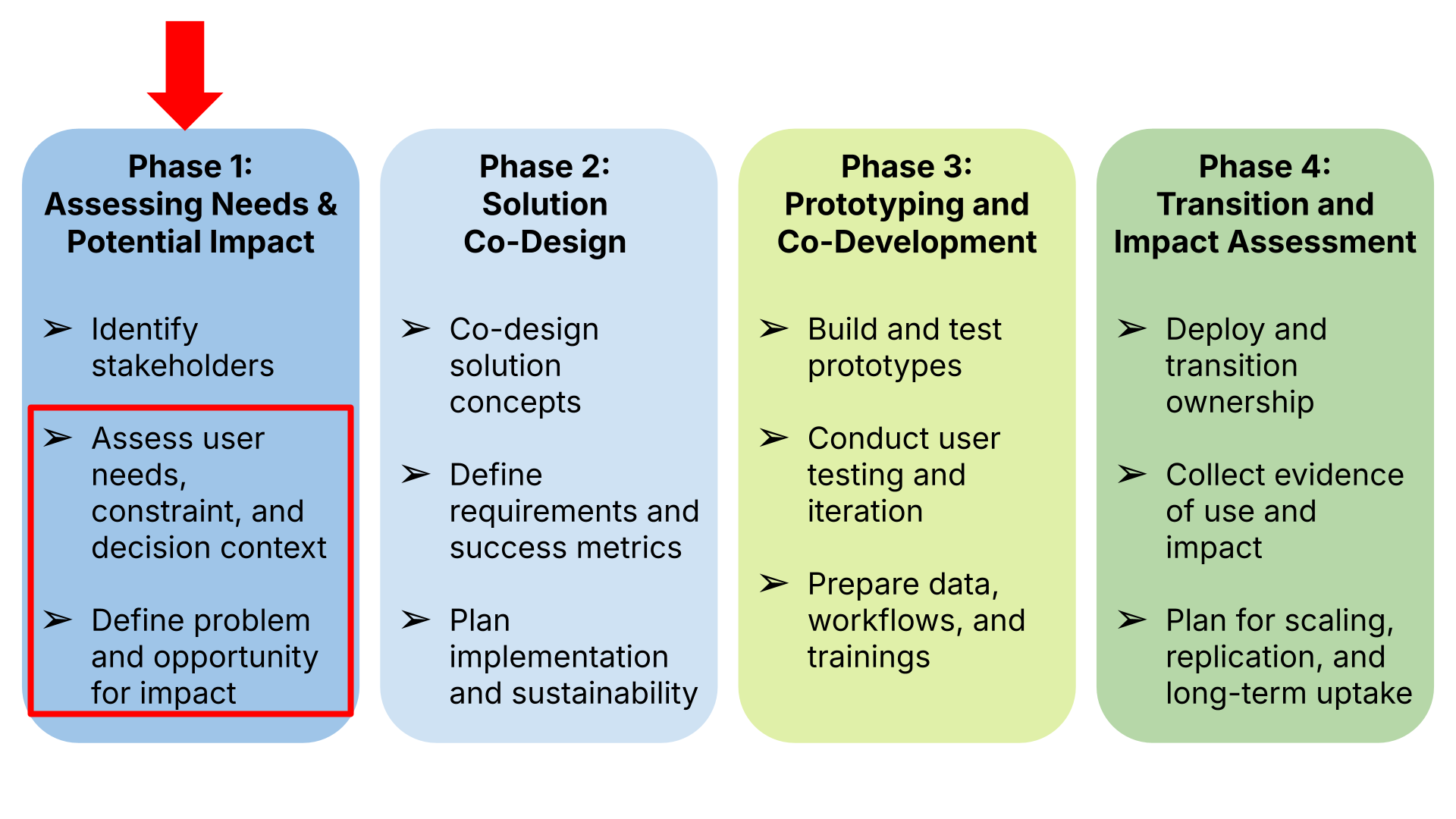
This is a rapid, activity-level tool that helps NASA teams capture, clarify, and prioritize the needs, challenges, decision contexts, and constraints of key user groups identified in the stakeholder mapping step. The goal is to produce a clear and actionable snapshot of what users need from a potential EO-enabled solution. The tool provides:
- A structured way to map user tasks and decision points.
- A lightweight method to identify gaps between current practice and desired outcomes.
- A rapid synthesis of constraints, including technical, institutional, policy, cultural and social factors.
- Clear priorities for what the solution must do, should do, and should not attempt to do.
Needs assessment is vital because projects frequently move into solution design before fully understanding user realities and clearly articulated needs. This tool helps NASA teams:
- Clearly articulate the problem or challenge the solution is intended to address
- Clarify core user tasks, decisions, and pain points.
- Identify non-negotiable requirements and practical constraints.
- Distinguish between expressed wants and actual functional needs.
- Understand how EO data could integrate, improve, or disrupt existing workflows.
- Reduce risks of misalignment, over-engineering, or building tools users cannot adopt.
How and When To Use this Tool:
NASA Earth Action Solutions Co-Development Toolkit, v0.1 | 46
The Needs Assessment Tool is used after completing the Stakeholder Mapping process. Use the Needs Assessment Template for each priority group to capture:
- A list of priority user needs, gaps, and pain points
- A summary of workflow constraints and barriers to EO integration
- A first-pass set of functional EO needs
- A clear list of design implications and "do/do not" guidance
- Inputs for problem statements, co-design, and technical scoping
Workflow, Roles & Timeline
Workflow, roles and timeline estimated based on steps and guidance captured in Needs Assessment Template with Step-by-Step Guidance
| Step | Activity | Led By | Duration | Output | Notes |
|---|---|---|---|---|---|
| Step 1 | Identify & prioritize user groups | Needs Assessment Lead + EO Specialist | 1–2 days | Prioritized user list + decision contexts | Use Stakeholder Mapping outp Define role, decision type, ope rhythm, EO literacy. |
| Step 2 | Map tasks & current workflow (interviews + walkthroughs) | Engagement Lead + EO Specialist | 3–10 days | Workflow snapshots + pain points log | Use semi-structured interview prompts. Capture workflow step → decision → consequence. |
| Step 3 | Identify needs & decision friction | Needs Assessment Lead | 2–3 days | Categorized needs (3–7 per user group) + initial priorities | Group recurring patterns. Prioritize (High/Med/Low or Do Now/Do Next). Complete Assessment Check before moving forward. |
| Step 4 | Identify institutional & feasibility constraints | Technical Lead + Engagement Lead | 1–2 days | Constraints log (technical, institutional, cultural, access, intermediary, team/science) | Apply feasibility lens. Distinguish user frustrations from structural realities. |
| Step 5 | Translate needs into draft EO requirements | EO Specialist | 2–3 days | Draft EO attributes + delivery requirements | Define minimum viable spatial/temporal/latency/format attributes. Link each to a priority need. |
| Step 6 | Validate draft snapshot with user group | Needs Assessment Lead | 2–3 days | Reviewed and refined needs + requirements | Quick validation call/workshop. Confirm priorities, usability, constraints. Not a full co-design session. |
| Step 7 | Finalize Needs Assessment Snapshot | Core Team | 1–2 days | Phase 1 Needs Assessment Summary | Capture top needs, workflow implications, feasibility guardrails, EO opportunity areas. Input to Phase 2 planning. |
Assessment Methods and User Data Collection
A needs assessment requires structured data collection and analysis with user groups. To do this effectively, project teams must make deliberate choices about which engagement and analysis methods to prioritize. The guidance below highlights the most common data-collection approaches and provides recommendations for selecting and applying them. As you consider these methods, also determine if your team requires additional expertise.
Core Methods
These methods are high-priority for typical user needs assessments (balance of reach, speed, and insight). Depending on the scale and scope of the proposed solution, usually two or more of these methods will be used.
- 1 Surveys & Questionnaires — Short structured instruments used to reach many respondents quickly and quantify needs, attitudes, or constraints. Best for reaching many respondents quickly, measuring prevalence of needs/attitudes, and stratifying by user type. Note: shorter surveys (under 2 mins.) receive the most feedback.
- 2 Focus Groups — Small facilitated discussions (5–8 people) to explore shared priorities, reactions, and tradeoffs. Excellent for surfacing shared priorities, testing reaction to proposed features, and exploring tradeoffs among user segments.
- 3 Discovery Interviews — Semi-structured one-on-one conversations to understand motivations, pain points, decision contexts, and edge cases. Deep, qualitative understanding of user motivations, decision contexts, and edge cases.
- 4 Workflow Walkthroughs — A step-by-step review of how tasks are performed, what information is used, and where decisions happen. Converts user descriptions into concrete steps, decisions, and data inputs — essential for mapping requirements to operational reality.
NASA Earth Action Solutions Co-Development Toolkit, v0.1 | 48
Optional
Use when resources, context, or the research questions require additional data collection.
NASA Earth Action Solutions Co-Development Toolkit, v0.1 | 49
Practical Rules for Picking Methods:
Core Methods
| Method | Most Useful in Step(s) | Rationale | Level of Support & Design Rigor |
|---|---|---|---|
| Surveys & Questionnaires | Step 3, Step 6 | Good for capturing broad decision context, validating needs and gaps at scale (Step 3), and summarizing/validating findings (Step 6). | Level 1–2 depending on scope and analysis depth |
| Focus Groups | Step 3, Step 6 | Effective for surfacing tradeoffs, shared challenges, and collective priorities. Requires structured facilitation to avoid dominance bias. | Level 2–3 recommended |
| Discovery Interviews | Step 1, Step 2, Step 3, Step 4 | Foundational method for understanding decision context, authority, workflow logic, and constraints. Can range from structured stakeholder conversations to coded qualitative interviews. | Level 1–3 depending on depth |
| Workflow Walkthroughs | Step 2, Step 3, Step 4 | Essential for mapping tasks, identifying friction points, and uncovering indirect needs or feasibility barriers. Can be conducted informally or as structured task analysis. | Level 2–3 recommended |
NASA Earth Action Solutions Co-Development Toolkit, v0.1 | 50
Optional Methods
| Method | Most Useful Step(s) | Rationale | Level of Support & Design Rigor* |
|---|---|---|---|
| Observation / Shadowing | Step 2, Step 3, Step 4 | Captures tacit behaviors, real bottlenecks, and informal adaptations not always surfaced in interviews. Particularly valuable when workflow reliability is critical. | Level 3 recommended |
| Document & System Review | Step 1, Step 2, Step 4 | Establishes baseline workflows, policies, tools, and technical constraints. Often a low-burden but high-value method. | Level 1 |
| Usage Analytics | Step 2, Step 3, Step 4 | Reveals actual behavior patterns and performance constraints where existing platforms or logs exist. Complements qualitative insights. | Level 2 |
| Participatory Mapping | Step 1, Step 3, Step 6 | Valuable when spatial variation or geographic equity is central. Supports user identification, needs articulation, and synthesis. | Level 2–4 depending on scale and sensitivity |
Level of Support & Design Rigor Key:
Minimal specialized training required.
NASA Earth Action Solutions Co-Development Toolkit, v0.1 | 51
Data Analysis Guidance
This guidance builds on social science methods. However, the goal here is not academic research, but to identify patterns that affect decision performance. Therefore, this guidance has been adjusted accordingly.
1. From Notes to Codes
Following interviews or walkthroughs, analysts should review their notes to identify recurring issues, workarounds, constraints, and desired improvements. These observations should be translated into short, descriptive labels ("codes") that capture the essence of the issue.
Codes might reflect:
- A friction point ("data arrives too late")
- A workaround ("manual spreadsheet tracking")
- A desired state ("clear trigger thresholds")
- A constraint ("approval takes 3 days")
Example Scenario
Context: Interviews with regional flood managers
Raw Notes → Codes
- "We get satellite updates after the leadership briefing." → Data latency
- "We double-check forecasts against three sources." → Verification burden
- "I'm not sure what rainfall amount triggers road closure." → Threshold ambiguity
- "We wait for state confirmation before issuing alerts." → Approval dependency
2. Group Codes Into Themes
Codes should then be clustered into broader themes that represent consistent patterns across users or workflows. Each theme should reflect a meaningful condition that affects decision-making.
For instance:
- Timing-related issues → Decision-ready timing
- Threshold uncertainty and verification effort → Clear, defensible thresholds
- Approval delays → Authority clarity
Aim to identify 3–7 themes per user group.
NASA Earth Action Solutions Co-Development Toolkit, v0.1 | 52
3. Map Themes to Workflow & Decisions
Each theme should be mapped to where it appears in the workflow and which decision it influences. The analysis should also identify the consequence if the need is unmet.
For each theme, ask:
- Where does this appear in the workflow?
- What decision does it affect?
- What happens if unmet?
Example
| Theme | Decision Affected | Consequence if unmet |
|---|---|---|
| Decision-ready timing | Response activation | Delayed mobilization |
| Clear thresholds | Road closure | Over/under reaction |
| Authority clarity | Public alert issuance | Conflicting messages |
If a theme cannot be mapped to a decision, it may be low priority or insufficiently defined.
4. Prioritization (Value vs. Feasibility)
The final step in turning findings into actionable design decisions involves prioritization. To achieve this, use the table below to rate each need according to value (impact on decision, burden reduction) and feasibility (technical, data, partner constraints). The result should help prioritize findings and inform priorities and workflow. Note: validating the findings with stakeholders is always a good idea and can help further clarify where the analysis may have been misleading or inadequate.
NASA Earth Action Solutions Co-Development Toolkit, v0.1 | 53
Output: Prioritized list (Do now / Do next / Nice to have / Avoid).
| Low feasibility | Medium feasibility | High feasibility | |
|---|---|---|---|
| High value | High Impact / Low Feasibility "Challenging but Important" (evaluate for more feasible alternatives) |
High Impact / Medium Feasibility "Wins worth the extra effort" |
High Impact / High Feasibility "Major Wins" and "Quick Wins" |
| Medium value | Medium Impact / Low Feasibility "Mostly Avoid" |
Medium Impact / Medium Feasibility "Nice to Have" |
Medium Impact / High Feasibility "Valuable Wins" |
| Low value | Low Impact / Low Feasibility "Avoid" |
Medium Feasibility Low Impact "Mostly Avoid" |
Low Impact / High Feasibility "Optional, Easy Wins if Resources Allow" |
Interview Guide and Sample Prompts
This interview guide is grounded in established social science methods, including semi-structured interviews, critical incident recall, and workflow elicitation. These approaches are shown to surface key information about barriers, needs, and opportunities that structured questionnaires often miss. As with obtaining any personalized data, it is key to establish trust and transparency about how the information will be used so participants know they can speak honestly. The following approach can help to capture accurate, decision-relevant insights that can be translated into actionable requirements.
For Interviewers: Creating a Productive Conversation
Approach interviews as open, collaborative conversations. Begin with concrete examples, allow participants to fully finish their thoughts, and follow what feels most important to them rather than rigidly adhering to the guide. When people sense that you are genuinely listening, rather than evaluating their performance or selling a product or service, they are more likely to share uncertainty, workarounds, and real constraints. These moments often yield the most valuable insights, revealing the needs, boundaries, and non-negotiables that should shape any eventual solution.
NASA Earth Action Solutions Co-Development Toolkit, v0.1 | 54
Set the Tone: Listen Before You Solve
- Anchor the conversation in lived experience. Invite participants to walk through recent, specific situations rather than asking them to assess needs in the abstract.
- Hold back on proposing solutions early. Allow interviewees to describe challenges fully before introducing any tools, datasets, or capabilities—this helps avoid biasing responses toward pre-defined answers.
- Signal curiosity, not evaluation or judgement. Make it clear you are there to learn, not to judge performance or validate a proposed approach.
Let the Conversation Flow (With Purpose)
- Use the guide as a compass, not a script. Follow meaningful threads and ask follow-up questions when they surface important context or insight.
- Go deep where it counts. Spending time unpacking a few concrete examples is often more valuable than trying to cover every topic.
- Leave space for participants' ideas. Their suggestions for tools or data may differ from—and improve upon—initial assumptions.
Pay Attention to What People Do, Not Just What They Say
- Look beyond stated preferences. Compare what participants' stated wants against how their workflows actually operate and where workarounds appear.
- Surface constraints explicitly. Ask about policies, approvals, capacity, timelines, and institutional limits—needs that ignore constraints are rarely actionable.
- Listen for uncertainty and friction. Moments of hesitation often reveal the most important design considerations.
Sense-Check Assumptions as You Learn
- Question whether EO is truly the bottleneck. Sometimes the key insight is that data access isn't the limiting factor—and that finding is still critical.
- Triangulate across interviews. Validate emerging patterns by checking for consistency across roles, organizations, and observed practices.
- Accept partial coverage. It's okay if not every question is answered in every interview; coherence across interviews matters more than completeness within
NASA Earth Action Solutions Co-Development Toolkit, v0.1 | 55
Interview Prompts
This is a menu of prompts — not a script. Use what fits the conversation. The goal is to surface decision context, needs, gaps, constraints, and priorities.
| Section | Purpose | Core Prompt | Optional Follow-Ups / What to Listen For |
|---|---|---|---|
| 1. Ground the Conversation in Real Work | Establish role, authority, and decision context (Supports Steps 1–3) | "To get us oriented—can you tell me about your role and the kinds of decisions you're involved in? Which of these depend on satellite-based or geospatial data?" | Listen for: decision authority, frequency, operational rhythm, data familiarity |
| 2. Walk Through a Recent Decision | Anchor discussion in real workflow (Backbone of needs assessment) | "Think back to the last time you had to [insert decision]. Can you walk me through how you made it?" | What triggered the decision? • What information came first? • Where did it come from? • Who was involved? • Where did things slow down? Listen for decision points, not perfect timelines. |
| 3. Surface Gaps (Indirectly) | Identify needs & pain points (Step 3) | "As you worked through that decision, what difficulties did you encounter?" | Moments of guessing? • Data arriving too late? • Information hard to interpret or explain? Listen for latency, ambiguity, verification burden, workarounds. |
| 4. Explore EO / Geospatial Use | Understand NASA relevance & fit-for-use | "What maps, satellite data, or geospatial products did you use?" | If used: what was helpful? What steps made it usable? If not used: Why not? Listen for availability vs. usability vs. integration barriers. |
| 5. Surface Workarounds | Identify hidden "must-have" requirements | "When things don't quite line up, how do you work around it?" | If the workaround disappeared, what would happen? Workarounds often reveal high-value needs. |
| 6. Clarify What 'Useful' Means | Define scale, timing, and format without technical interrogation | "When you're making this decision, what does 'useful' information look like?" | Detail level? Timeliness? Format? Delivery method? |
| 7. Understand Confidence & Comfort | Gauge adoption likelihood (trust without saying "trust") | "How confident do you feel using this information to justify a decision?" | When do you hesitate? Is it easy to explain to others where it came from? |
| 8. Surface Constraints Naturally | Capture feasibility realities (Step 4) | "Are there things that make it hard to change how this work is done—even if better tools existed?" | Approval processes • Staff capacity • Infrastructure • Policy/legal limits |
| 9. Shift to Priorities | Direct input for must / should / should-not | "If we could only improve one part of this process, what would make the biggest difference?" | What sounds nice but not worth the effort? • What would you worry about a new solution overdoing? |
| 10. Close the Loop | Validation & stakeholder expansion | "Does this reflect your experience?" "Is there anything we missed?" "Who else should we talk to?" | Ask if they're willing to review a short summary later. |
NASA Earth Action Solutions Co-Development Toolkit, v0.1 | 56–57